
A real completion record, explained
How to read an e-signature audit trail.
Keep the signed PDF and its completion certificate together. The certificate describes recorded activity; the PDF carries the signed document. Here is what a real, controlled Naxas Sign test shows and how to check the result.
Reviewed 21 October 2026. This is a synthetic test, not a customer agreement or a claim about legal validity.
An actual test certificate
We created a one-page test document, added signature and date fields, completed the assigned signing step and downloaded the completed PDF with its certificate. The excerpt below comes from that generated record. Its event labels and timestamps are retained.
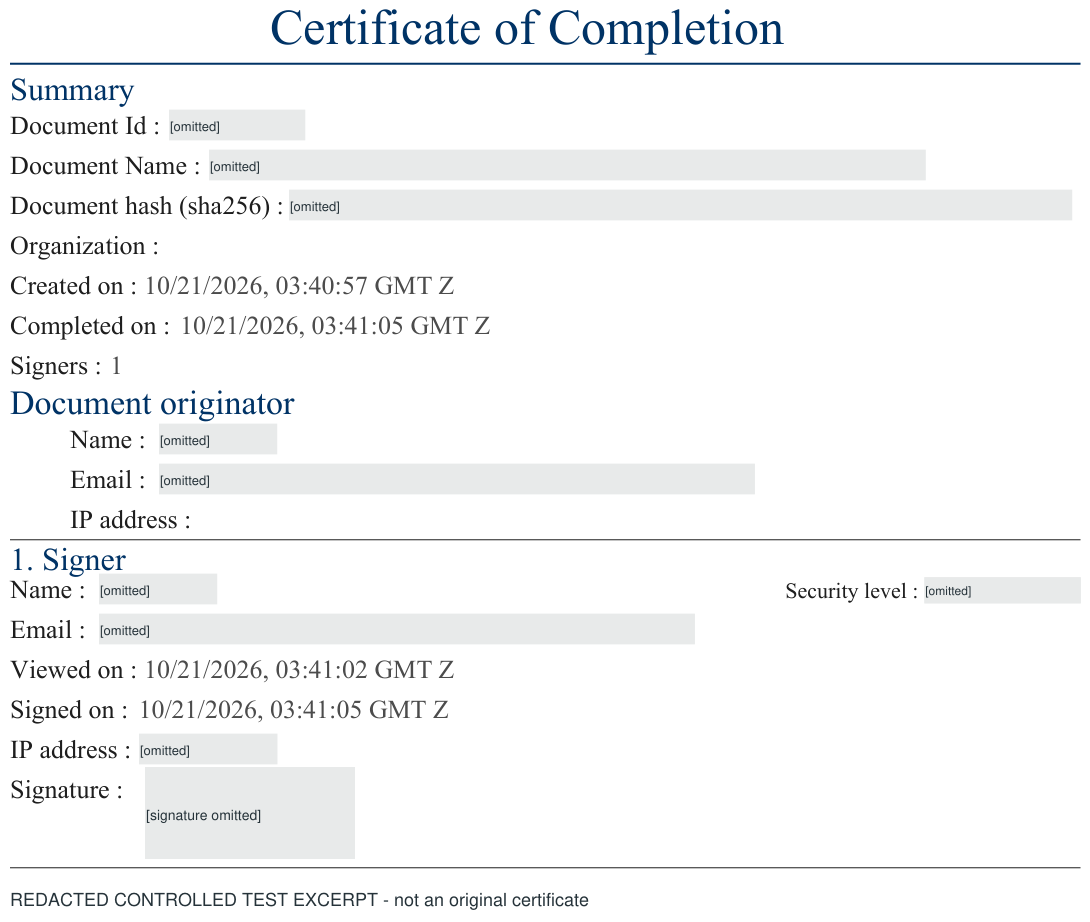
The original certificate's SHA-256 value matched the original downloaded signed PDF byte for byte. The app's signature-integrity check accepted that original PDF and rejected a changed copy. Redacting, cropping or recreating a record produces a different file, so those results apply to the originals, not this illustration.
What the recorded fields tell you
| Field | How to use it |
|---|---|
| Document identifier and name | Connect the certificate to the intended request. Check both against your records rather than relying on a filename alone. |
| Document hash (SHA-256) | Compare the recorded digest with a SHA-256 digest of the exact original downloaded PDF. A matching digest identifies the same bytes in that comparison; it is separate from verifying the PDF's cryptographic signature. |
| Created and completed times | Read the timestamps and their displayed timezone. In this example, the request was created at 03:40:57 and completed at 03:41:05, GMT Z. |
| Signer and originator details | Review the recorded participants and compare them with your intended recipients. A name or email printed in a record is not, by itself, proof of legal identity. |
| Viewed and signed times | Follow the recorded sequence. This test shows viewing at 03:41:02 and signing at 03:41:05, GMT Z. One test does not establish every workflow's sequence or duration. |
| Network address | Treat it as connection metadata. A proxy or shared network address should not be treated as a person's postal address or an identity check. |
Use actual workflow settings and authentication evidence when assessing sign-in or one-time-code requirements. A security-level label printed on a certificate is not sufficient evidence that a particular challenge occurred. This guide does not claim an OTP challenge was completed in this authenticated-owner test.
Check the original signed PDF
-
Keep the original download
Download the completed PDF and certificate from the completed request. Keep an unchanged copy before adding annotations, converting formats or saving it through another editor.
-
Select the PDF in signature verification
Open Naxas Sign's document verification, select the original signed PDF and choose Verify signature. Use the PDF rather than a screenshot, scan or this article's redacted image.
-
Read the actual result
Our original test returned Signature integrity verified. Its changed copy returned Document could not be verified. A file that cannot be verified needs investigation; that result alone does not explain whether the cause is an alteration, unsupported signature or incomplete coverage of the file.
-
Retain the supporting record
Keep the unchanged PDF, its certificate and relevant agreement records together under your own retention policy. Integrity verification does not determine whether the agreement is appropriate for a jurisdiction or prove the signer's legal identity.
Common questions
Is the certificate the same as the signed PDF?
No. In this test the download bundle contained the completed signed PDF and a separate completion-certificate PDF. The bundle's completed PDF matched the individual PDF download exactly. Retain both; they serve different purposes.
Does this demonstrate every type of agreement or signer?
No. This example uses one synthetic participant and one completed request. It does not establish every recipient-verification method, a customer's workflow, legal validity, certification or compliance with a particular regulation.
Can I verify the redacted example?
No. It is a labelled raster excerpt for reading the fields. It is not a signed original and contains no verification link. Use your own original completed PDF in the verification tool.
Plan the whole workflow
Know what you will retain before you send.
Review the request-signature workflow, available features and data-handling boundaries. For sending allowance and team access, see pricing or discuss your requirements with our team.